Before Unit 3 · Lesson 2 of 3 · 25 minute session
Addresses: MAC, IP, ARP, DNS and ICMP
Every connected device has two addresses: a media access control (MAC) address, which names its network card on one local link, and an internet protocol (IP) address, which locates it across networks. The address resolution protocol (ARP) pairs the two inside a local area network (LAN), and the domain name system (DNS) turns names into IP addresses. Neither one checks its answers, which is exactly what ARP poisoning and DNS poisoning exploit.
Course and exam description (CED) codes covered: 3.1.A.13.1.A.33.1.A.43.1.C.53.2.A.23.2.B.43.4.D.23.5.E.33.5.E.53.5.E.6
Last reviewed against the CED:
By the end of this session you can
- Describe a MAC address and distinguish it from an IP address.
- Identify the network portion, range and broadcast address of a /24 network, and classify an address as private or public.
- Explain how ARP pairs IP and MAC addresses, and how ARP poisoning redirects traffic and is detected.
- Explain how DNS turns a name into an IP address, and how DNS poisoning leads to credential harvesting.
- Describe ICMP and ping, and explain a smurf attack.
MAC addresses: the name tag on a network card
A MAC address identifies a network interface card. Switches use it to deliver frames inside a LAN.
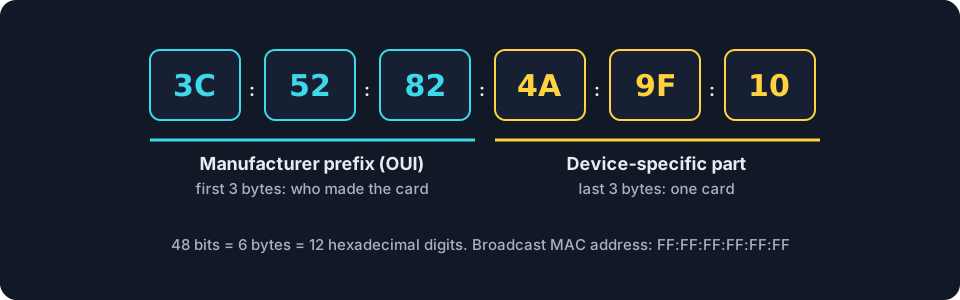
- Format. 48 bits (6 bytes), written as six pairs of hexadecimal digits, such as
3C:52:82:4A:9F:10. Windows writes it with hyphens:3C-52-82-4A-9F-10. - Manufacturer prefix. The first three bytes, the organizationally unique identifier (OUI), identify the company that made the card. The last three bytes identify one card.
- One local link only. MAC addresses are used between two devices on the same link. A router builds a new frame, with new MAC addresses, for the next link.
- Broadcast MAC address.
FF:FF:FF:FF:FF:FFdelivers a frame to every device on the LAN.
Spoofing and filtering. Software can make a device send a MAC address other than its own: MAC spoofing. MAC filtering allows only listed MAC addresses onto a switch port or a wireless network, which prevents unauthorized devices from joining [3.2.A.2, 3.2.B.4]. On the exam, enabling MAC filtering is a valid control. Beyond the CED, know that spoofing a listed address can get around it, so it works best alongside other controls. Many phones also send a random MAC address to each Wi-Fi network for privacy, a legitimate use of the same mechanism.
IP addresses and address ranges
An IP address is a numerical identifier assigned to a device’s connection by the network it joins. It usually changes when the device moves to another network; the MAC address normally stays the same.
An IPv4 address is 32 bits, written as four numbers from 0 to 255 separated by periods, such as 192.168.1.10. It has two parts:
- the network portion, shared by every device on the network (here
192.168.1), and - the host portion, different for each device (here
.10).
Like room C-14 at school: the wing letter C is the network portion and the room number 14 is the host portion.
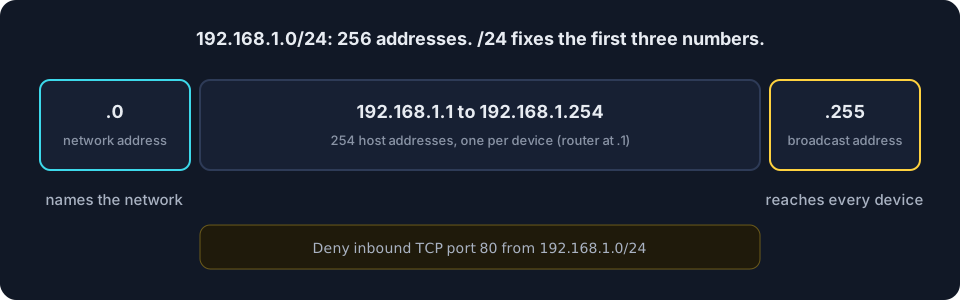
Prefix length. In the notation 192.168.1.0/24, the number after the slash says how many bits form the network portion. A /24 fixes the first three numbers and leaves the last one free: 256 addresses, from 192.168.1.0 to 192.168.1.255.
| Range | Fixed part | Addresses |
|---|---|---|
| 192.168.1.0/24 | 192.168.1 | 256 |
| 172.16.0.0/16 | 172.16 | 65,536 |
| 10.0.0.0/8 | 10 | 16,777,216 |
These rows show range sizes. The private block that starts at 172.16 is larger: 172.16.0.0/12.
- The lowest address names the network and the highest is the broadcast address: a packet sent to it reaches every device on that network. Neither is given to a device.
- Firewall rules use ranges. “Deny inbound TCP port 80 from 192.168.1.0/24”, where TCP is the transmission control protocol, applies to every source from
192.168.1.0to192.168.1.255[3.4.D.2]. - Private and public addresses.
10.0.0.0/8,172.16.0.0/12and192.168.0.0/16are private: reused inside local networks and not routed on the internet. Most other addresses are public. In a log, a private source address usually means traffic from inside the organization.
ARP: from IP address to MAC address
To deliver a packet on a LAN, a device needs the receiver’s MAC address, but it usually knows only the IP address. The address resolution protocol (ARP) fills the gap.
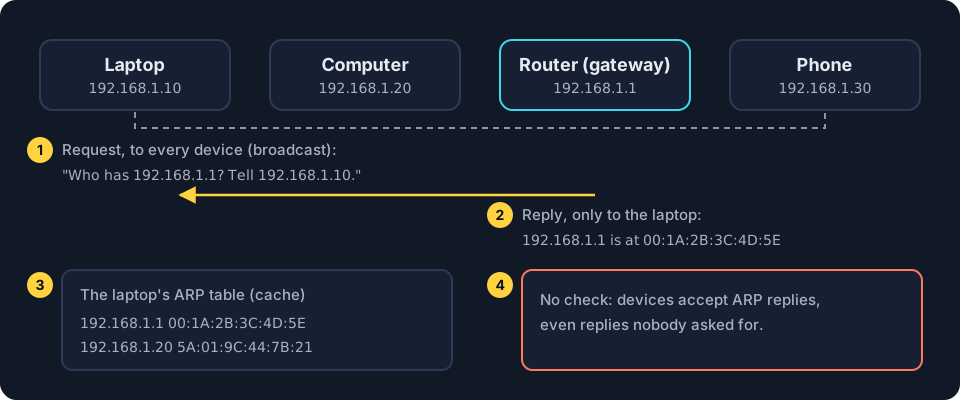
- Request. The laptop broadcasts: “Who has 192.168.1.1? Tell 192.168.1.10.”
- Reply. Only the device with that IP address answers with its MAC address.
- ARP table. The laptop stores the pair in its ARP table (ARP cache) for a while. Routers keep ARP tables too.
- No check. ARP cannot verify a reply. Devices accept replies, even ones nobody asked for.
ARP poisoning
Because ARP accepts unrequested replies, an adversary on the LAN can send falsified ARP packets to the default gateway. The gateway’s ARP table then pairs the target’s IP address with the adversary’s MAC address, so traffic meant for the target goes to the adversary first. The falsified packets misrepresent which MAC address belongs to the target, which is why ARP poisoning goes hand in hand with MAC spoofing. The adversary copies or alters the data and passes it on, so neither side notices: an on-path attack, also called a man-in-the-middle attack [3.1.A.1].
Detection: look for one MAC address listed for two IP addresses, in ARP packets or in the default gateway’s ARP table [3.5.E.3]. Try it in the simulator below.
DNS: from name to IP address
People remember names; computers connect to IP addresses. The domain name system (DNS) translates one into the other.
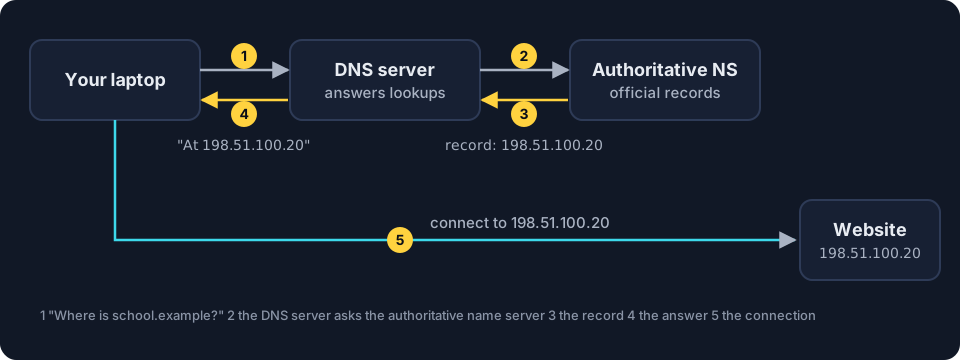
- The laptop asks its DNS server for the IP address of a domain name.
- If the DNS server does not know, it asks the authoritative name server (NS), which holds the official records for that domain.
- The name server replies with the DNS record, which pairs the name with an IP address. The DNS server caches a copy.
- The DNS server tells the laptop, and the laptop connects. It trusts the answer and cannot check it.
DNS poisoning
In DNS poisoning, an adversary pretends to be an authoritative name server and plants a fake record on a DNS server. Every user of that DNS server is sent to the adversary’s address, often a convincing copy of a login page. Users type real passwords, which the adversary collects: credential harvesting [3.1.A.3].
Detection: it is hard to see, because the site looks normal. One sign is an abrupt, unexplained drop in traffic to the organization’s real website, which should prompt a check of the DNS records [3.5.E.5].
ICMP and ping
The internet control message protocol (ICMP) carries short test and error messages between devices. The ping tool sends an ICMP echo request and waits for an echo reply. ICMP has no port numbers.
- Smurf attack. The adversary sends ICMP requests to a network’s broadcast address with the victim’s address forged as the source. Every device replies to the victim, and the replies flood it: a denial of service [3.1.A.4]. The sign is a sudden increase in ICMP requests sent to a broadcast address [3.5.E.6].
- External ICMP. Replies reveal which devices exist, so Unit 3 rates an external firewall that does not block ICMP from outside as a moderate risk [3.1.C.5].
Where this shows up in Unit 3
| CED | Example in Unit 3 | What you need to do |
|---|---|---|
| 3.1.A.1 | falsified ARP packets sent to the default gateway | explain how the target’s IP address gets paired with the adversary’s MAC address |
| 3.5.E.3 | one MAC address for two IP addresses | identify the indicator of ARP poisoning |
| 3.1.A.3 | a fake record redirects a bank’s name | explain DNS poisoning and credential harvesting |
| 3.5.E.5 | an abrupt drop in website traffic | examine the DNS records |
| 3.1.A.4, 3.5.E.6 | many ICMP requests to 192.168.1.255 | identify a smurf attack from the broadcast address |
| 3.4.D.2 | Deny inbound TCP port 80 from 192.168.1.0/24 | identify the source addresses the rule covers |
Common misconceptions
"A MAC address cannot be changed."
Not quite. Software can make a device send a different MAC address. This is MAC spoofing, and it is how MAC filtering is bypassed.
"/24 means 24 devices."
Not quite. /24 is the number of network bits. A /24 network holds 256 addresses.
"ARP works across the internet."
Not quite. ARP works only inside one LAN. For other networks, a device asks for the MAC address of its default gateway.
"DNS poisoning changes the real website."
Not quite. The real website is untouched. A fake DNS record sends visitors somewhere else.
"Ping uses a port."
Not quite. Ping uses ICMP, which has no port numbers.
Simulation · ARP poisoning [3.1.A.1, 3.5.E.3]
Simulator: poison the gateway's ARP table
You play both sides. First watch normal delivery, then attack as the adversary, then defend by spotting the indicator.
Default gateway's ARP table
| IP address | MAC address |
|---|---|
| 192.168.1.10 | 3C:52:82:4A:9F:10 |
| 192.168.1.66 | 66:0B:5D:E2:21:AD |
Ready. Step 1 sends a web page from the internet to the target through the gateway.
Read the steps without the simulator
- Normal delivery. A web page for 192.168.1.10 arrives at the default gateway. Its ARP table pairs 192.168.1.10 with 3C:52:82:4A:9F:10, so the gateway sends the frame straight to the target.
- The attack. The adversary at 192.168.1.66 sends the gateway falsified ARP replies saying "192.168.1.10 is at 66:0B:5D:E2:21:AD". ARP cannot verify replies, so the gateway updates its table.
- On the path. Traffic for 192.168.1.10 now goes to the adversary's MAC address first. The adversary copies or alters it, then forwards it to the target, so neither side notices: an on-path attack.
- Detection. The table now lists 66:0B:5D:E2:21:AD for both 192.168.1.10 and 192.168.1.66. One MAC address for two IP addresses is the indicator of ARP poisoning.
| After the attack: IP address | MAC address |
|---|---|
| 192.168.1.10 | 66:0B:5D:E2:21:AD |
| 192.168.1.66 | 66:0B:5D:E2:21:AD |
Checkpoint · 6 questions
Checkpoint: Addresses
Pick an answer to mark it. Every answer is explained. Your score stays in this browser only.
Key terms
- MAC address
- A 48-bit identifier of a network interface card, written in hexadecimal and used to deliver frames on one local link.
- MAC spoofing
- Making a device send a media access control (MAC) address other than its own.
- IP address
- A numerical identifier assigned to a device's connection by the network it joins, made of a network portion and a host portion.
- Broadcast address
- The highest address of a network, such as 192.168.1.255; a packet sent to it is delivered to every device on that network.
- Address resolution protocol (ARP)
- The protocol that finds the media access control (MAC) address belonging to an internet protocol (IP) address on the same local area network (LAN), and stores the pair in an ARP table.
- ARP poisoning
- Sending falsified address resolution protocol (ARP) packets so a device's ARP table pairs the target's internet protocol (IP) address with the adversary's media access control (MAC) address.
- On-path attack
- An attack in which the adversary secretly sits between two parties, capturing and possibly altering the data they exchange.
- Domain name system (DNS)
- The system that translates domain names into internet protocol (IP) addresses, using DNS servers, authoritative name servers and DNS records.
- DNS poisoning
- Planting a fake domain name system (DNS) record on a DNS server so users are redirected, typically to a malicious website.
- Credential harvesting
- Collecting real usernames and passwords through a fake login site.
- Internet control message protocol (ICMP)
- A protocol for short test and error messages between devices, used by ping; it has no port numbers.
- Smurf attack
- A denial-of-service attack: internet control message protocol (ICMP) requests sent to a broadcast address with the victim's address forged as the source, so all replies flood the victim.
Questions students ask
What is the difference between a MAC address and an IP address?
A MAC address is set by the manufacturer and names a network card on one local link; switches use it to deliver frames. An IP address is assigned by the network the device joins and locates it across networks; routers use it to forward packets.
How does ARP poisoning work in AP® Cybersecurity?
An adversary on the LAN sends falsified ARP packets to the default gateway, so the gateway's ARP table pairs the target's IP address with the adversary's MAC address. Traffic for the target goes to the adversary first, which makes it an on-path attack. The warning sign is one MAC address listed for two IP addresses.
How is DNS poisoning detected?
DNS poisoning is hard to see, because users reach a normal-looking site. One sign named in Unit 3 is an abrupt, unexplained drop in traffic to the organization's website, which should prompt a check of the DNS records.
What is a smurf attack?
The adversary sends ICMP requests to a network's broadcast address with the victim's IP address forged as the source. Every device on the network replies to the victim, and the replies flood it: a denial of service.