Before Unit 3 · Lesson 3 of 3 · 15 minute session
Wireless basics: access points, SSIDs and beacon frames
A wireless access point connects devices to the wired local area network (LAN) by radio and announces the network's name, its service set identifier (SSID), in beacon frames several times a second. Radio does not stop at the walls, so anyone within range of the signal can see those beacon frames, listen to the traffic and try to connect.
Course and exam description (CED) codes covered: 3.1.B.43.1.B.63.1.C.63.2.B.13.2.B.23.5.E.13.5.E.2
Last reviewed against the CED:
By the end of this session you can
- Describe how a wireless access point announces and provides a network.
- Explain why a signal that reaches beyond the building is a risk, and how organizations limit it.
- Recognize an evil twin, a rogue access point and a jamming attack, and how each is detected.
How a wireless network is announced
A wired device must be plugged into a port inside the building. A wireless device only needs to be within range of the radio signal.
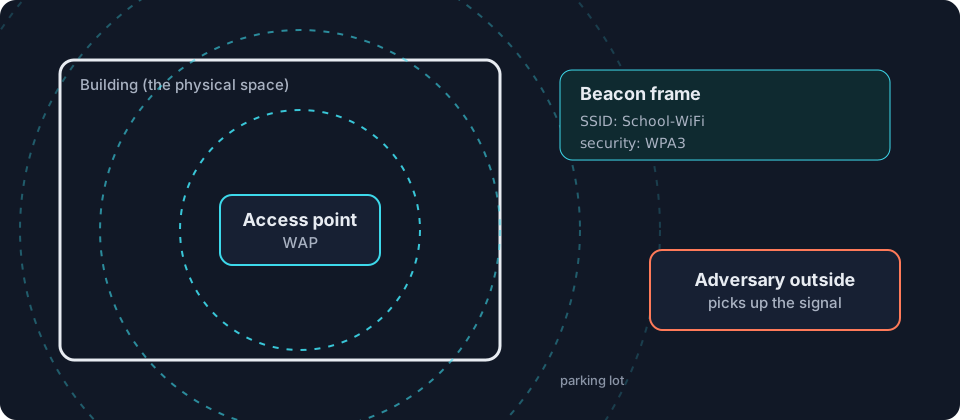
- The access point. A wireless access point (WAP) connects wireless devices to the wired LAN. Laptops and phones send and receive frames by radio instead of by cable.
- Beacon frames. Several times a second, the access point broadcasts a beacon frame announcing the network’s name, the service set identifier (SSID), and the wireless encryption protocols it uses. That is how a device lists the networks nearby.
- Range. Radio waves do not stop at walls. The signal can reach the parking lot or the building next door.
- Anyone in range can listen. An adversary outside can receive the beacon frames and every frame sent through the air, then try eavesdropping or try to break the encryption [3.1.B.4].
A conversation by an open window can be heard from the street.
Unit 3 rates access points that broadcast beacon frames as a low risk [3.1.C.6]. Organizations reduce it in two ways [3.2.B.1, 3.2.B.2]:
- Disable beacon frame broadcasting so the network is not advertised.
- Control the broadcast direction and signal strength of each access point so the signal does not extend beyond the physical space.
Evil twins and rogue access points
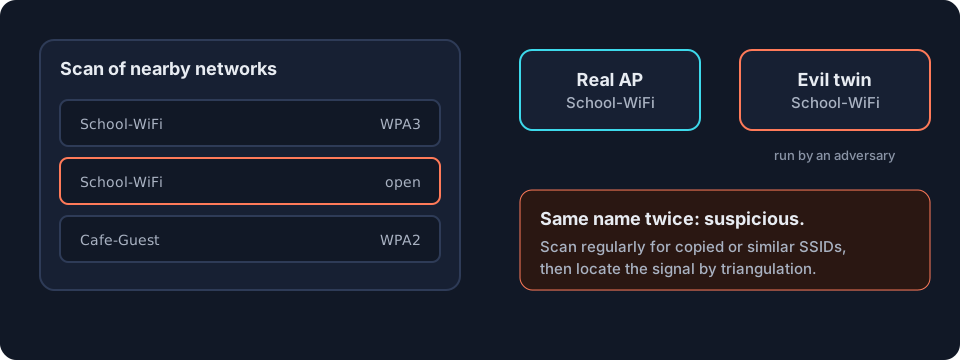
- An evil twin is an access point set up by an adversary with the same SSID as a legitimate network, or a very similar one, so users join it by mistake and send their traffic through the adversary.
- A rogue access point is an unauthorized access point plugged into an open network data port inside the building. It gives the adversary wireless access to the LAN, even from outside, and bypasses the firewalls at the boundary [3.1.B.6].
Detection [3.5.E.1]. Scan regularly for SSIDs that copy or resemble the real ones. To find the device, locate the signal by triangulation: measure its strength from several places, then disable it.
Jamming
A jamming attack fills the wireless frequencies with radio noise so that devices cannot communicate: an attack on availability. Detection [3.5.E.2]: no wireless device in one area can connect, and a scan of the wireless frequencies shows electromagnetic (EM) noise.
Try it on your own device
Open your list of Wi-Fi networks. Each name is an SSID taken from a beacon frame. Count how many networks from neighboring buildings you can see: their signals reach beyond their walls too.
Where this shows up in Unit 3
| CED | Example in Unit 3 | What you need to do |
|---|---|---|
| 3.1.B.4 | an adversary in the parking lot picks up beacon frames | explain the risk of a signal beyond the physical space |
| 3.2.B.1, 3.2.B.2 | a wireless security policy | recommend disabling beacon frame broadcasting and controlling broadcast direction and signal strength |
| 3.1.C.6 | access points that broadcast beacon frames | rate the risk as low and justify it |
| 3.1.B.6 | an access point plugged into an unused wall port | explain how a rogue access point bypasses the firewalls |
| 3.5.E.1 | a scan lists a copy of the real SSID with different security, or a look-alike name | identify a likely evil twin and locate it by triangulation |
| 3.5.E.2 | no device in one area can connect | recognize jamming and scan for EM noise |
Next in Unit 3, wireless security continues with encryption protocols and authentication in topic 3.2.
Common misconceptions
"Hiding the SSID makes a network invisible."
Not quite. Disabling beacon frame broadcasting makes the network harder to find, but devices that join it still send its name, so a determined adversary can learn it.
"Only people inside the building can use the Wi-Fi."
Not quite. Anyone within range of the signal can try to connect, including someone in the parking lot.
"An evil twin and a rogue access point are the same thing."
Not quite. An evil twin imitates a legitimate network's SSID to lure users. A rogue access point is an unauthorized device plugged into the organization's own network.
Checkpoint · 6 questions
Checkpoint: Wireless basics
Pick an answer to mark it. Every answer is explained. Your score stays in this browser only.
Key terms
- Wireless access point (WAP)
- A device that connects wireless devices to a wired local area network (LAN) by radio and announces the network in beacon frames.
- Service set identifier (SSID)
- The name of a wireless network, announced in beacon frames.
- Beacon frame
- A frame a wireless access point broadcasts several times a second to announce its service set identifier (SSID) and wireless encryption protocols.
- Eavesdropping
- Capturing data in transit in order to read, record or copy it.
- Evil twin
- An adversary's access point that copies or imitates a legitimate network's service set identifier (SSID) so users join it by mistake.
- Rogue access point
- An unauthorized wireless access point connected to an organization's network, often through an open data port.
- Jamming
- Broadcasting radio noise so wireless devices cannot communicate: an attack on availability.
- Triangulation
- Locating a signal's source by measuring its strength from several positions.
Questions students ask
What is a beacon frame?
A beacon frame is a frame a wireless access point broadcasts several times a second to announce its SSID and wireless encryption protocols. It is how your phone builds its list of nearby networks. In Unit 3, broadcasting beacon frames is rated a low risk.
What is the difference between an evil twin and a rogue access point?
An evil twin is an adversary's access point that copies or imitates a legitimate SSID so users join it by mistake. A rogue access point is an unauthorized access point plugged into an open network port inside the organization, which gives wireless access to the LAN and bypasses the firewalls.
How do organizations stop their Wi-Fi from reaching outside?
They can disable beacon frame broadcasting so the network is not advertised, and control the broadcast direction and signal strength of each access point so the signal covers only the intended space.
How is a jamming attack detected?
No wireless device in one area can connect, and a scan of the wireless frequencies shows electromagnetic noise.